

Help your teams manage customer demand with smarter routing, clearer reporting and better visibility across every interaction, backed by UK-based support.
Book a contact centre reviewExplore cloud communicationsLive dashboards | Intelligent routing | Queue visibility | UK-based support
CUSTOMER SERVICE
LIVE OPERATIONS
Real-time visibility helps managers understand what is happening across customer service at any given time. Queues, wait times, missed calls and team availability can be viewed together, making it easier to respond before delays begin to affect the customer experience.

See live demand across queues and teams, helping managers understand where enquiries are building and where support may be needed.

Track how long customers are waiting, spot pressure earlier and adjust resources before delays begin to affect service levels.

Identify where customers are unable to get through, understand the patterns behind missed calls and improve routing or team availability.

View agent availability, queue activity and team performance more clearly, making it easier to manage workloads and respond to changing demand.
REAL-WORLD USE
Cloud contact centres can be configured around different types of enquiries, service teams and customer requirements. Routing, priorities and workflows can then be shaped around how each part of your organisation operates, rather than forcing every team into the same setup.
Manage inbound calls, queues, callbacks and service levels across customer-facing teams.
Route technical and service enquiries to the right people with clearer escalation paths.
Help citizens, patients, tenants and service users reach the appropriate team more quickly.
Manage repairs, general enquiries, emergency lines and service updates through clearer call flows.
Route new enquiries effectively and give your teams better visibility of follow-up activity.
Create a consistent call-handling approach across departments, offices and locations.
JOINED-UP COMMUNICATIONS
A cloud contact centre relies on more than queues and reporting. Connectivity, cloud telephony, Microsoft Teams and business messaging can all form part of the wider customer communication setup.
Because dbfb supports these services too, we can look at how they work together rather than treating your contact centre as a standalone platform.
Help agents work with colleagues and specialists outside the contact centre when extra support is needed.
Align contact centre queues and call flows with wider business calling across your organisation.
Use SMS for reminders, confirmations, service updates and follow-up communication.
Support call quality, platform access and availability across office and remote teams.
REAL-TIME REPORTING
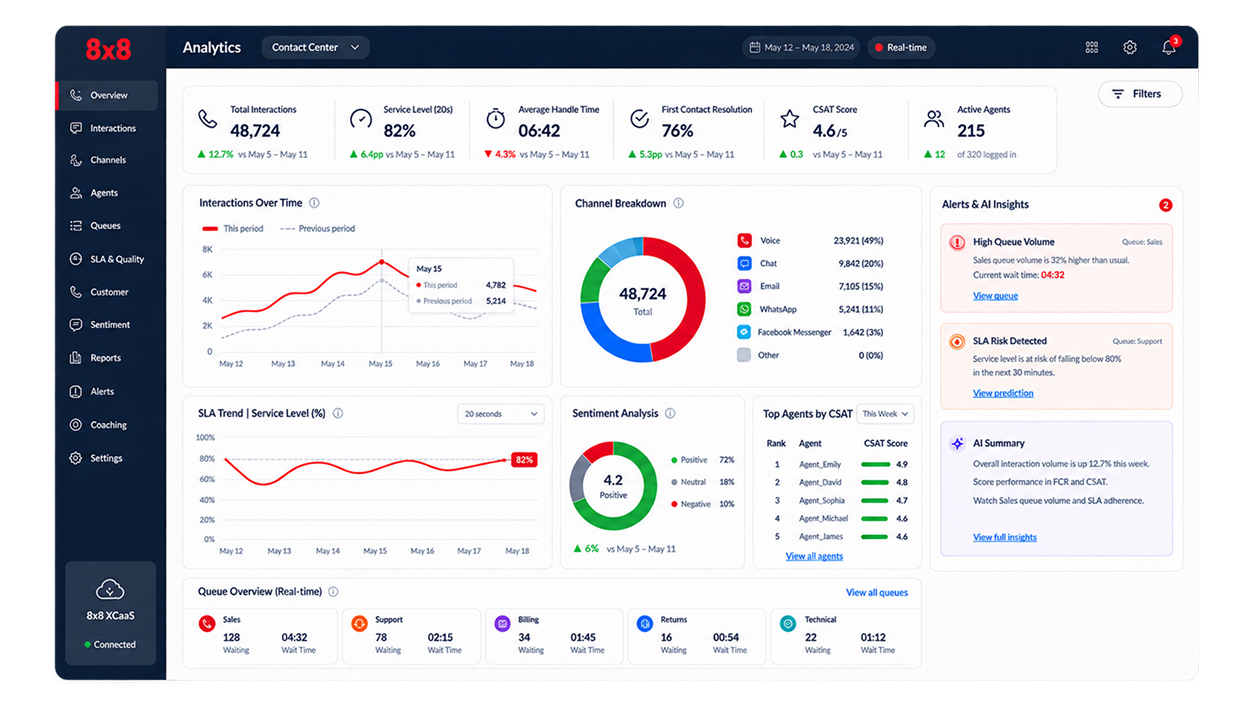
Real-time and historical reporting gives managers a clearer view of contact centre performance across the day, week or longer term. Track call volumes, queue activity, wait times, missed calls and agent activity in one place.
This makes it easier to spot pressure points, understand service trends and make more informed decisions around staffing, routing and customer experience.
CONNECTED TO YOUR TOOLS
A cloud contact centre can integrate with CRM, helpdesk and other business applications, helping teams access useful customer information and reduce manual updates.
Where supported, integrations can also connect conversations with cases, customer records and follow-up activity, giving teams better context when dealing with enquiries.
Give teams access to relevant customer information and interaction history.
Connect calls with service requests, cases and follow-up processes.
Make it easier for agents to involve colleagues and subject specialists.
Support confirmations, reminders and service updates alongside voice calls.
ONE ACCOUNTABLE TEAM
The right setup depends on how customers contact you, how enquiries move through your teams and the service levels you need to maintain. Queues, routing, permissions and reporting all need to reflect the way your operation actually works.
dbfb helps shape the service, manage the launch and support it once live, giving you one team to work with throughout.
01
Departments, opening hours, call types, queues, overflow routes and customer journeys are considered together before configuration begins.
02
Routing, menus, escalation paths, dashboards, roles and permissions are set up around the needs of agents, supervisors and managers.
03
Configuration, testing, user access and training are coordinated carefully to help teams move onto the platform with less disruption.
04
Regular reviews of call patterns, service levels, reporting and feedback help the contact centre continue to meet changing demand.
FAQS
ready to review
Give your service teams clearer routing, reporting and control across customer demand.